Get the latest information on latest technology, mobile and telephony technology...almost everyone is computer literate now but your information gives you the edge.
Make some money online just by browsing, blogging etc.. stick on to learn more
Griffin a company specialized in design and manufacture of computer peripherals, consumer electronics, and accessories for smartphones and mobile devices has launched its DriveSafe range of in-car products, a family of docks and adaptors which are all aimed at making smartphone use while driving as safe as possible.
A selection of in-car mounts which starts with the RoadTrip HandsFree,
A dock that plugs into the cars cigarette power socket and then uses a FM transmitter to then send your music to the cars FM stereo.
For those with an AUX adapter you can also get the WindowSeat HandsFree and the WindowMount Handsfree both which come with an AUX cable and in-line mic for handsfree calling.
There's even a tape adapter for those still rocking the in-car cassette player, by placing the tape adapter into the cassette player an AUX cable then feeds into the devices headphones socket and with an in-line mic handsfree calling is still just as easy.
There's seven products in total with prices ranging from £19.99 (N5,000) for the tape adapter up to £64.99 (N17,000) for the all-in-one RoadTrip HandsFree.
Apple’s next-generation iPhone 6 will finally match up to its key Android rivals and pack a 5-inch, Full HD 1080p display. That’s according to new rumours emerging from Japan, published in Mac Fan magazine.
The move to a larger screen would not be a huge surprise. Apple is said to have been testing larger, phablet-style phones for months, with a slew of stories of 6-inch devices emanating from supply-chain sources throughout the summer.
This new piece of tittle tattle, though, says a 5-inch number is nailed-on. While Mac Fan’s sources' credentials as sources of juicy info remain unclear, it's undoubtedly fair to say that a device of that size wouldn’t be seen as too large by most consumers.
The magazine also claims the iPhone 6 will launch in September 2014. That seems almost a given, what with the iPhone 5s and iPhone 5 arriving in the same timeframe in the past two years.
Expect to hear plenty more gossip about Apple’s next iPhone as 2014 looms into view.
Some guys just won't rest on Tim Cook's surprises as September 10 seems too far.
Side-by-side photos of what are billed as the two forthcoming Apple smartphones appeared on the website of known Apple leaker Sonny Dickson. Let's keep our fingers crossed
I got this amusing Gadget and it works perfectly with my iphone 4s. I don't regret having this lovely piece despite the price being on the high side. $99.9 is much but legend is worth it.
Simply intuitive. Smart Sensor technology reacts when you put the headset on, letting you quickly take a call without a click. If you’re already wearing it, Voyager Legend announces who’s calling and waits for you to say "Answer" or "Ignore." Simply tap the voice command button and ask to check battery level, connection status, and more. With technology this nimble, Voyager Legend is the first truly intelligent Bluetooth® headset. Do almost all without touching your phone, it works seamlessly with the iphone siri technology. I'm impressed with the battery, the sensitivity, easy switch and moisture protection.
Google announced a groundbreaking device at its “Breakfast with Sundar” event on Wednesday. The Chromecast, a $35 dongle that plugs into your TV and streams content from any of your mobile devices, was immediately compared to Apple’s streaming device and streaming software, the Apple TV and AirPlay, respectively. Some argue the Chromecast is an Apple TV killer, while others say the device isn’t quite there yet. How exactly does Chromecast stack up against Apple TV? Let’s take a look. Chromecast streaming vs. AirPlay
Though many people are comparing Chromecast and AirPlay, the way in which each device streams content is different. The Chromecast plugs into your HDTV’s HDMI port, connects to your Wi-Fi network, and then works as a portal to fling content from your laptop, tablet, or smartphone to your TV. There’s no user interface or remote, as the device you’re using becomes the remote. If your Wi-Fi signal is low, or you’re having a spotty Wi-Fi day, you’re out of luck. Chromecast will only work with a strong Wi-Fi signal as it streams from the cloud only.
AirPlay, on the other hand, streams from device to device. Apple’s technology is built into iPhones, iPads, and Macs that run versions of OS X that supports it. To use it for audio and video, you have to buy the Apple TV (you can use AirPlay to stream audio only to speakers connected to an Apple AirPort Wi-Fi base station; Apple also partnered with a number of manufacturers, so you can buy a “Made for AirPlay” speaker or sound system to wirelessly stream music).
The Apple TV runs a modified version of OS X with a user interface that you can navigate with the included remote, so you can play content via apps that run natively on the Apple TV without ever picking up your iPhone. When you do stream stuff from your phone, you can tap the AirPlay icon in a specific app – Photos, Videos, Music, Safari, or other AirPlay-enabled apps like YouTube and HBO Go – and stream everything to your HDTV via your Apple TV. Your device and Apple TV must be connected to the same network for the AirPlay icon to appear. For apps that don’t support AirPlay, you can “mirror” your entire iPhone or iPad on the big screen via Apple TV streaming. Streaming video
Chromecast streaming and AirPlay do share a common UI feature. In both, you simply press a button in a supported app and the content is streamed onto your TV. Chromecast manages to take it a step further by allowing you to continue performing tasks on your device without interrupting your video stream.
Apple’s iOS 5 did add AirPlay Multitasking, but currently not all apps support it. For example, HBO Go lets you exit the app without breaking the stream to the Apple TV, so you can continue watching Game of Thrones on the big screen while you look up the episode’s synopsis in Safari on your phone. The YouTube app, on the other hand, breaks the stream if you leave the app. When you’re using AirPlay’s mirroring feature, though, your TV will show exactly what’s on your device’s screen, so it can’t multitask when it’s in that mode. Hopefully we’ll start seeing all AirPlay-enabled apps support multitasking soon.
As for its YouTube integration, Chromecast features something that
AirPlay does not. Chromecast allows you and anyone else connected to
your Wi-Fi network to add videos to your Chromecast’s queue. Anyone with
a smart device (again, that’s any laptop, tablet, or smartphone –
doesn’t have to be an Android device) connected to your television can
add content to this list. Apple TV only supports Apple devices with AirPlay capabilities, so your friend with a Nexus 7
can’t join in the fun. Plus, if you want to view something from a
different device, you’ll have to disconnect one and then connect the
other – no connecting multiple devices at once. In terms of content available to each device, the Apple TV wins
there. True, the Chromecast can fling anything in a Chrome tab onto a
TV, but besides that, it currently only has a handful of partners,
including Netflix, YouTube, Google Play, and Chrome. Apple TV, on the
other hand, has access to Netflix, Hulu Plus, HBO Go, YouTube, Vimeo,
and a number of sports channels, not to mention access to content from
the iTunes Store. However, according to Sundar Pichai, Google’s SVP of
Android, Chrome and Apps, that’s going to change. He expects more
partners to join soon.
LOOKS
Chromecast, however, the Apple TV looks bulky. Google’s device is tiny in comparison. The 2-inch, USB key-shaped dongle looks a lot like a traditional flash drive. However, it too must be plugged into a power source, and then plugged into your TV’s HDMI port – something Google doesn’t mention in its documentations unless you dig deep enough to find it in the device’s support page. Device compatibility
Google believes that all devices should be able to stream content easily, a point it stressed numerous times during its press event. Recognizing that not everyone uses the same family of devices, Google made the Chromecast capable of working with laptops, tablet, and smartphones running Android, iOS, OS X, Windows, or Chrome (exceptions include BlackBerry and Windows Phone). So, even if you’re in a house full of people whose tastes in brand loyalty differ, you can all still share videos, music, and photos at the touch of a button. We finally have a streaming device that blurs the lines between brands. PRICING For just under $100, you can grab an Apple TV with a remote, HDMI cable, and a power cord. The Chromecast ($35) comes with the device, an HDMI extender, a USB power cable, and a power adapter. Both devices are available via Amazon or Best Buy, and each can be bought in their respective online stores. Conclusion
There’s no “winner” here. These are two different devices for two different customers. For those who let only iOS and OS X products cross the threshold of their home, the Apple TV is the way to go. You’re okay with spending a little bit more for an Apple product, so you’ll likely be okay with paying a little more for an Apple TV. If you’re on a tight budget, the Chromecast is the ticket. Costing about what you’d pay for a tank of gas, the Chromecast won’t break the bank. Plus, if you live in a world of cross-platform devices, you’ll be glad to have an easy way to stream content from your devices to your TV without having to invest in an expensive set-top box or smart TV.
The battle for dominance of the smartphone world is one that has been raging for a few years. With the migration of consumers from feature phones to modern wonders such as the iPhone 5 and the HTC One, or even the cheap as chips offerings like the Nokia Lumia 520 or Huawei Ascend G330, it is clear where the money, and the future lies.
We've seen some impressive hardware come and go, quad-cores grace most flagship devices (i.e. Sony Xperia Z or HTC One) and there is even the quad/octa core that sits inside the Samsung Galaxy S4, dependent on your location.
Needless to say, all the big guns in the tech industry have some level of input into the mobile OS world. Apple has iOS (just about to reach iOS 7), Google has Android, the most recent version being 4.2 Jelly Bean, Microsoft has Windows Phone 8, leaving BlackBerry with its hopes pinned on BB10.
Interface
The iOS 7 interface is a radical new look compared with previous iterations. Although with a clean and modern new look, the formula based upon simplicity is one that has been stuck to. Icons have had an overhaul, and there is transparency through apps, giving iOS devices a more unified feel.
Users familiar with previous iOS versions may be in for a bit of a shock, with elements such as the lock screen taking a new look. Elements now seem more rounded, and much brighter than before. On the face of it, things seem very different with iOS 7, but the real changes go deeper.
Android is currently sitting at version 4.2, which is another iteration of the popular Jelly Bean OS. Jelly Bean built upon the work done by 4.0 Ice Cream Sandwich, with everything being much smoother with 'Project Butter', and the introduction of Google Now.
Pretty much every OEM has placed a skin over the top of Android, take a look at HTC's Sense, Samsung's Touchwiz or Huawei's Emotion UI.
That said, nigh on every version builds on the use of multiple home screens populated with widgets, and apps being kept tidy in a 'drawer'.
Microsoft's offering bases itself around a system of 'LiveTiles'. These are used in a similar way to widgets on Android, providing information at a quick glance. Users of Windows Phone 7, or Windows 8 on tablets or desktops will feel right at home.
In terms of user customisation, much like iOS, Windows Phone 8 is relatively closed. Live Tiles can be resized, so that more important tiles can take up more screen real estate, and the tile colour can be any of 20 variations. It is also possible to change the lock screen, to bring up photos, or widgets and notifications.
Out of Canada comes BB10, with BlackBerry pinning pretty much all its hopes on the OS. In a similar way to Windows Phone 8, BB 10 allows 8 'Active Frames', of which only 4 are visible at one time.
These show the most recent apps used, as well as any information that app may offer, be it weather or calendar events.
Being a totally different OS to prior BlackBerry OS iterations, BB10 is at first a little confusing to use. Closing apps by running your finger up from the bottom of the screen feeling a little unnatural.
The BlackBerry 10 lock screen comes complete with notifications, calendar events and ability to quick launch the camera.
With the Camera app being one of the most widely used features on the modern smartphone, it is only natural that every OS has given the camera a certain level of attention. One feature we are very fond of, that appears on iOS 7, pretty much every Android UI and BB10 is the ability to launch the app directly from the lock screen.
iOS 7 brings in a raft of changes to the camera app. There isn't a whole load of changes deep down, these being limited more to photo effects; varying lens shapes and live photo filters giving you the Instagram look, without having to use the app. Elsewhere, the interface has become more swipe-friendly.
The Gallery app has also had a few tweaks, meaning that photo's are arranged by location, being titled 'moments'. Pinching to zoom will re-draw your library, highlighting days out or holidays. Pinching further shows an overview of the year's photos, complete with location tags.
Android's camera app is one that gets a lick of paint with each UI that is placed over the top. Also, with the incredible variation in Android devices, each camera is different, the HTC One being most notable for camera tech with UltraPixel and HTC Zoe, or there is Samsung with Burst Mode found on the Galaxy S3 or S4. Android Jelly Bean camera app
That said, there is an underlying theme that graces Android's camera and gallery app. Photo filters are common place, even the basic Android devices offer Sepia, Monochrome and Negative effects. Gallery apps are a little more varied, however most can pull down images from the cloud, from Picasa/Google+ web albums, with some going so far as Facebook albums too.
Being a unified OS across all devices, Windows Phone 8 camera settings are common. Pinch to zoom has been brought in, and the ability to take photos by tapping the screen making the app feel a little more natural. There is also the idea of 'lenses', that allow you to use camera tools that you have downloaded, rather than via a separate app. Windows Phone 8 camera app
BlackBerry was keen to show off their camera at the BB10 launch. The reason for this is something that the Canadians are terming 'Time Shift'. This is a nifty piece of tech that, if selected, allows you to go 'back in time' to find the perfect smile. It even works on multiple faces, however needs good lighting.
BB10's other features include standard scene and shooting modes, as well as the ability to use the volume keys as a shutter button.
The original iPhone launch in 2007 put media on phones very much back in the spotlight. iOS7 continues that, given that it will be available on the 5th gen iPod Touch, as well as later iPad versions.
iOS 7 now incorporates your iCloud stored media, allowing you to see all your tracks in one place, with a wall of album art in Landscape mode adding a nice look to things.
The biggest revolution it brings is iTunes Radio, Apple's much rumoured and talked about music streaming service, previously dubbed iRadio. We are unable to comment on the exact release, with availability confirmed for 'this fall' in the US, with the rest of the world left waiting for news. We can say that there will be both a free (ad-funded) and premium service, though.
As for apps, Apple's App Store is by far the most famous of all app stores/markets across all OS'. iOS7 brings in some updates, such as being able to search for apps based on age range, or the 'Apps near me' feature, which shows you the most popular apps in your location. Apps can also update in the background.
Storing all this media, and all your apps is done in true Apple fashion, with varying sizes of internal storage available. MicroSD is still unsupported, although we never expected, nor ever expect that to change.
Playing catch up in the media department, Google has launched its Play Books, Play Magazines, Play Movies and Play Music apps. Whilst nowhere near as popular as the iTunes version, media downloading is now a lot easier on Android devices.
Downloading apps is also very easy, as Google's rebranded Play Store has become a very attractive and very functional marketplace, with different sections and lists of apps for you to peruse. Auto updating is available, and disable-able too.
The Windows Phone 8 and BlackBerry app stores are far less populated in comparison to both the Google and Apple offerings, although we would be doing them a disservice by calling their offerings sparse (BB10 has 120,000 apps compared to iOS' 900,000), especially given that the Microsoft OS has Xbox compatibility.
Since Android 2.2 Froyo, apps to microSD has been a standard feature, alongside its long supported media storage feature. App installation on microSD is also supported via Windows Phone 8, with standard microSD support also being available in BB10.
NFC
With NFC slowly becoming more prevalent across devices, it has been noticed on the lower end handsets that we have reviewed (LG Optimus L5 2, Huawei Ascend G510, Samsung Galaxy Fame to name but a few), OS support is vital.
NFC wasn't something that wasn't explicitly mentioned with the launch of iOS7. Until now, previous iOS devices haven't come with NFC chips. We could look into this and say things about upcoming iOS touting devices, such as the unlikelihood of NFC inclusion, with the claim that there's 'No need to wander around the room bumping your phone with others.' That said, apps will be able to share information via Airdrop, provided that it supports Share Sheet.
Android has supported NFC for a while. Android Beam has been used on devices to share data since Android 4.0 Ice Cream Sandwich. Certain manufacturers have taken it a little further, with Samsung adding it's S title to create S Beam. Google's wallet application is also likely to make use of NFC as mobile payment becomes increasingly popular.
Windows Phone 8 also packs in NFC support, with its very own Microsoft Wallet app to rival Google's version, and BlackBerry has long had NFC in its handsets so it's no surprise BB10 also makes use of the technology.
Notifications and Control
Notifications are something that are very important across devices, giving quick access to Calendar events, Emails and Text messages. Device control is equally important.
iOS 7 makes a big deal out of both notifications and Control. The notifications centre that was accessed by swiping down from the top has become a full-screen affair, also available via the lock screen.
The Control Centre is where the real innovation lies, however. Previous iOS versions had a very basic centre, however now quick settings such as Wi-Fi and Bluetooth can be enabled or disabled, as well as controlling screen brightness, music being played, and access to AirDrop and AirPlay controls.
Android has had its notifications bar longer than Apple, so it has come on in leaps and bounds. Jelly Bean also brings in expandable notifications, showing more information about the top event, as well as being able to swipe to dismiss.
Many custom UI's include access to the quick settings (Touchwiz has gotten this nigh on perfect) in the notifications bar. Android also include a Power Control widget that can be placed on home screens, giving quick access to a lot of important settings.
Notifications aren't something that ever made it over to Windows Phone 8, however there are strong suggestions that there is a notifications centre making it over in Windows Phone 8.1. Notifications are viewable from the lock screen.
With BB10, there is a dedicated Notifications hub, accessed by swiping from the left hand side of the screen, as well as notifications that can be seen for individual apps such as Email, Texts or social networks.
Maps
Given the kerfuffle surrounding the launch of iOS Maps on iOS 6, there was a disappointing lack of map based announcements with iOS7, although 'developers have been making great improvements to Maps', which will bring features such as being able to push mapping info from a Mac of MacBook to an iDevice.
There has been no such problems for mapping on Android, given that Google has managed to port across its Google Maps desktop browser application so successfully.
Google maps provides one of the most comprehensive mapping apps available, as well as being able to provide information through its Local app, and sat-navving via the Navigation app. Google's recent acquisition of Waze is going to throw in user based traffic updates as well.
Microsoft has also got a decent map app. Bing maps brings over many features that were prevalent throughout Nokia phones of old, including Nokia's turn-by-turn directions from Nokia Drive. Other useful features include downloading maps for offline use, pinning favourite locations and Local Scout (similar to Google's Local).
BB10 provides a basic mapping option as well, covering turn-by-turn and traffic updates. The app is a fairly basic affair, with fewer features than the other options available on other devices.
Browser
You would expect, given that it was the key to revolutionising mobile browsing, that Safari on iOS7 would be important. You wouldn't be wrong. The URL bar is now resizable, you can swipe through the history, and the bookmarks and tabs have had an overhaul.
Bookmarks now sit on the home screen, drawing in data from your Twitter feed. Tabbing is no longer limited to 8, and is synchronised across multiple Apple devices through iCloud.
Since Ice Cream Sandwich, Google has mobilised its Chrome browser, which now interestingly sits alongside the native Android Internet app. We've not understood why both browsers are run side by side, but it provides a little choice. Google bookmarks can be synced across, and incognito browsing is available too.
Internet Explorer is available on Windows Phone 8 devices, with the version being nearly identical to IE10, even if it looks a little different. Internet Explorer is a very accomplished mobile browser overall, and comes with the Do Not Track feature by default, as well as SmartScreen phishing protection.
BB10's browser is a minimalist design, with the URL at the bottom of the page, akin to IE on Windows Phone 8. BB10 does pack in some useful features, such as a Reader mode that lifts text and images, making it more readable. We also found that the BB10 browser was lightning fast, which is a major tick in anybody's book.
Multi-Tasking
iOS7 brings more changes to the Multi-tasking window as well. No longer does a swipe from the bottom bring up recently used apps, but a newer interface that shows information from the app screen, as well as the app icons along the bottom.
Google's multi-tasking has been handled for a long time through the long press of the home button, if the device has one, or through the dedicated button on total touch screen devices. This brings up a quick window of what was last on the app whilst you were using it, and can be swiped to dismiss.
Windows Phone 8 has a similar method of bringing up its multi-tasking window. Long pressing the back button brings up the multi-tasking screen, allowing users to flick across to the app they wish to use.
RIM have implemented a multi-tasking action, which is vaguely reminiscent of cards on WebOS. The Canadians call this 'Cascades', accessed by swiping left to right. BB10 also uses the multi-tasking screen on the home page we mentioned earlier, that gives access to your eight most recently used apps, shown four at a time.
Apple have said that iOS7 will be available on a large amount of its iDevices, from the iPhone 4 upwards, iPad 2 and up, iPad Mini and iPod Touch 5th generation. iOS7 is due to launch 'this fall', and we would highly expect it to launch alongside at least one new iDevice, the iPhone 5S/6, iPad 5 or iPad Mini 2.
Android Jelly Bean has been around for two years now, available on devices from multiple OEMs, and with devices now being launched 4.1 or 4.2. There is a lot of talk of Android 4.3 Jelly Bean also being released at some point this year, and rumours of the Key Lime Pie (Android 5.x) also being launched this year.
It is available on the highest end devices, from a variety of OEMs, such as the five star HTC One, and at the bottom end of the market on devices such as the LG Optimus L3 2.
Windows Phone 8 is also available on devices from different OEMs, with Nokia Lumia devices being the most talked about. HTC, Samsung and Huawei also have their own devices out and about.
Talk of Windows Phone Blue, or 8.1 has also been bandied about, with an expected release alongside Windows 8.1. Current devices span the market, again from a variety of OEMs, with the high end Nokia Lumia 925, or the low end Lumia 520.
BB10 is unavailable on all new BlackBerry devices, the BlackBerry Z10, Q10 and Q5. Being a whole new OS, it is unavailable on previous BB7 toting devices.
As for BB10 on the PlayBook, your guess is as good as our at this point, with BlackBerry's 2012 annual conference stating that it would make its way across, although 12 months later, there is still no update. Being an all new OS, BB10 is now available on the BlackBerry Z10, BlackBerry Q10 and announced BlackBerry Q5.
The iOS7 launch is arguably as important to the Cupertino-based firm since Steve Jobs first took the stage in 2007 to launch the original iPhone.
A number of previous devices (iPhone 4, 4S, 5, iPad 2, 3, 4, iPad Mini and iPod Touch 5th generation) will be getting the update, with the OS also being a major precursor to the upcoming iPhone 5S/6, iPad 5 and iPad Mini 2.
Apple therefore has a very large existing customer base ready to upgrade, with those on earlier iDevices also potentially looking to the launches of the next line of products. iOS is also highly successful in the business market, as well as the personal market.
It is therefore almost impossible to say that iOS7 will be a flop, after all the trouble that Apple maps gave iOS6, it is still very popular. Android is Apple's biggest worry, with Windows Phone 8 and BB10 making strides through the mobile market, yet still not as firmly established.
Android handsets are still the most popular on a world wide scale, but only just over a third are actually running Jelly Bean, with the fragmentation the major negative point against what is a highly versatile platform.
iOS7 will be massive, but don't forget it is really just the first OS refresh to launch this year, with Windows Phone 8.1, Android 4.3 Jelly Bean and/or 5.0 Key Lime Pie likely to arrive later in 2013. Expect to see the competition really heating up.
New Design Apple
has finally decided to give iOS a proper redesign. iOS has looked
almost identical update-to-update since the system first arrived back in
2007. That’s when the first iPhone launched – aeons ago in tech terms.
A
core part of the redesign is new icons. All the old designs have been
ditched in favour of a new look. The outline-heavy style of previous
versions has gone, in favour of a more supposedly chic look.
Who
is behind this new version? It’s Jonathan Ive, the man who was behind
the hardware design of the iPad, iPhone and the original iPod – which
made its debut in 2001. He's an Apple veteran.
It’s not all about
icons, though. All of Apple’s own apps have been given a new simplified
tweak, including Email, the camera app, the browser, the photo gallery
and – arguably the most important of all – the Apple keyboard.
iOS 7 Camera App The Camera app of iOS 6 has been completely
redesigned for iOS 7. In previous incarnations, the iPhone camera app
was the simplest mobile phone photo interface of them all – just giving you access to an HDR mode,
panorama, and the grid (seldom-used).
iOS 7’s camera app is
completely different. Apple has realised that iPhone users love things
like filters and the ability to easily share their photo history with
friends.
The iOS 7 camera app now offers eight hipster-friendly filters, and you can remove them after having applied them if you like.
There are now ‘photo collections’ too, which amass your photos into a
timeline that stretches over days, weeks, months – and even years.
Apple
is clearly out to blast services like Instagram into the past with iOS
7. Your photos are shared on iCloud, Apple’s cloud storage service.
Smart Multitasking Multitasking has been completely
redesigned in iOS 7. Instead of just showing you icons of apps you’ve
recently loaded, you’ll see shrunken previews of what’s on-screen,
similar to those seen in the near-defunct Palm WebOS.
Apps will
now learn when you search for updates in your daily schedule. So if you
look at Facebook every day at 9am, your iPhone will update that app just
before that, so you’re ready to see all your friends’ latest inane
insights.
The idea is that this will help iOS 7 to save a bit of
battery, so it won’t have to look for updates 24/7. iOS 7 will also
capitalise on Wi-Fi connections, updating all its content when connected
in this manner – Wi-Fi uses less battery than 3G. We’ll have to see how this works in person.
AirDrop Apple has been criticised by many for not including NFC in its latest devices. The iPhone 5, the iPad 4? No NFC.
The
iOS 7 stop-gap is AirDrop. This uses Wi-Fi Direct and Bluetooth to let
you share files – primarily photos, contact and videos - with people
nearby.
If anything, Bluetooth and Wi-Fi are actually superior
Wi-Fi standards for this purpose as their ranges are far greater than
NFC, which peters out after about 10cm. You’ll still have to select a
contact to send files too as well, so you shouldn’t find random
strangers sending you photos either. Safari Redesign The
Safari browser of iOS has been given a long-needed overhaul. In common
with the rest of iOS 7, it now tries to keep things simple, with an
interface that hides interface elements until they’re needed.
Its
tabbed browsing view has also been changed. Rather than appearing as
flat planes, they appear as 3D animated tabs – five of which can be
shown on-screen at once.
Safari now uses iCloud too, letting you
save your passwords and logins so you don’t have to type them in every
time. And, for the social networkers out there, you save your ‘reading
list’ URLs and share them over Twitter if you like.
SiriiOS
7's Siri is a little more advanced than before. Most of the updates are
‘experiential’, meaning you should only notice it’s better without
necessarily realising why. There’s more feedback about when Siri’s
listening and not. You no longer have to guress.
Siri should no
longer have to leave the Siri app, either. Apple has done a deal with
Wikipedia that will see the voice assistant search Wikipedia within the
app, so it should almost never simply dump you out to a web search.
Like most kinds of computer networks, Wi-Fi supports varying levels
of performance depending on which technology standards it supports. Each
Wi-Fi standard is rated according to its maximum theoretical network bandwidth:
The performance of Wi-Fi networks practically never approaches these
theoretical maximums. 802.11b networks, for example, generally operate
no faster than about 50% of theoretical peak, around 5.5 Mbps. Likewise,
802.11a and 802.11g networks generally run no faster than 20 Mbps. And
even though 802.11n rates at 300 Mbps compared to wired Fast Ethernet at 100 Mbps, the Ethernet connection can often outperform 802.11n Wi-Fi in real-world usage.
Factors Limiting Wi-Fi Connection Speeds
The disparity between theoretical and practical Wi-Fi performance comes from network protocol
overhead, radio interference, physical obstructions on the line of
sight between devices, and decreasing signal strength with distance. In
addition, as more devices communicate on the network simultaneously, its
performance will also decrease.
A Wi-Fi network connection operates at the highest possible speed
that both devices (endpoints) can support. An 802.11g laptop connected
to an 802.11n router, for example, will network at the lower speeds of
'g'.
On home networks, the performance of an Internet connection is often
the limiting factor in end-to-end network speed. Even though most
residential networks support sharing files within the home at speeds of
20 Mbps or more, Wi-Fi clients will still connect to the Internet at the
usually lower speeds supported by Internet providers.
Wi-Fi performance continues to be improved with future generations of
the technology. Speeds upwards of 1 Gbps (1000 Mbps) are expected with
next-generation 802.11ac Wi-Fi.
Unexpected charges, fees and unsupported phone models.???
You want to get out, but even breaking the cell plan contract will
cost an alarming amount of money. So you wait it out, losing money every
day the plan is active. Maybe you need more minutes, or you want the
latest Droid but can’t switch, or you’re just not sure what your
financial situation will look like in four months. Why tie yourself down
like that? Fortunately, service providers have responded to the
public’s growing demand, and there are dozens of viable no contract plan
options for consumers looking to stay connected without committing to
anything long term.
On this site, we give the specs on various popular no contract plans,
service providers, and phone models. Whether you’re looking to cut your
bill, or you’re due for a new phone, we’re confident that with a little
browsing, you’ll definitely find the no contract plan for you!
Prepaid Or All-Inclusive?
Not surprisingly, there are two main options when choosing a
no-contract phone. You can either pay as you go (“prepaid”) or you can
sign up for monthly service, and pay each month. Both options let you
walk away whenever you choose to, which is the main attraction. Typical
wisdom is, if your phone and data usage is limited and you can reliably
anticipate it, you’ll probably be fine with a $20 or $40 phone plan.
Most of the major providers, such as Verizon, Boost Mobile, and Straight
Talk, all offer these types of “top-up” plans, which were originally
made popular in the UK and Europe. To reload your phone, you get either a
physical card with a scratch-off PIN, or your new mobile refill PIN is
sent via encrypted email.
However, if your usage is less predictable or you’re always chatting,
texting, and streaming video, you’ll probably be better off with an
monthly no contract plan. These can be PIN or account based, depending
on the provider. Often, a phone is included in the startup package.
These plans can be for either a set amount of minutes and data, or they
can be unlimited for the month. If you buy a set amount monthly plan and
go over, you’ll need to set yourself up with unlimited minutes.
However, reviews indicate that most of these plans do compare favorably
to yearly cell phone contract plans, making this an exciting option.
Supported No Contract Smartphones & Phone Models
As smartphones, with their heavy bandwidth usage, become more popular
around the world, they too are supported by no contract plans. Both the
iPhone, Blackberry, and the Droid can be set up to provide service with
a no contract plan. Not all phone models are supported, though, so if
there is a specific phone model that you have your heart set on, check
first to see if there’s a no contract carrier that supports it.
Service Coverage
The other major question to ask, of course, is if you’ll get service.
As with a contract phone plan, it’s advisable to check with a specific
carrier before committing, especially if you live in a less urban area.
These days, phone service is nearly guaranteed in major cities, but it
can still be spotty as you travel. Similarly, if you’re frequently out
of the country and want your phone, you may need a whole separate plan
when traveling. We’ve given a rundown of coverage areas for different
sites, and usually you can check a zip code to on the official
provider’s site to see if they offer coverage. Also worth noting is that
coverage may be different for different phone models. For example,
Straight Talk, one of the biggest no contract phone providers, has
fantastic US coverage for most models, but is still building up its
Droid network.
Google just announced a new unified messaging service today that will be available across multiple platforms and now the iOS app is officially available to download on the App Store.
Today at I/O, Google rebranded “Hangouts” as a new unified, cross-platform messaging system. It lets people text, photo, and group video message across Hangouts’ Android and iOS apps, plus its Gmail and Google+ site integrations. Hangouts rolls out today, replacing Google Talk [GChat] and G+ Messenger. While it doesn’t support SMS yet, it could challenge Facebook Messaging and Apple’s iMessage. For over a year, whispers from GigaOm, Droid Life and others signaled Google would undertake a big unification of its fragmented messaging offering. Today Google will offer new free iOS and Android Hangout apps, the Google+ integration, and you can upgrade from Google Talk to Hangouts by clicking on your photo in the Gmail chat list. There are currently no plans for other platforms like Windows Phone or Blackberry. Google’s Vic Gundotra said at I/O today in San Francisco that “Technology should get out of the way so you can live, learn, and love.” Operating systems and devices shouldn’t matter. You just want to talk with those you care about. That’s the point of the revamped Hangouts. It brings humans and conversations to the forefront.
Hangouts Is The Messaging Kitchen Sink
Presence, Circles, And Delivery
Let’s take a closer look at the features Hangouts offer. Presence, or knowing when friends are available to chat, is a big focus. You can see when friends are on Hangouts, if they’re currently typing, and if they’ve seen your messages [also known as read receipts]. Using Google+ Circles, you can select specific friends or a whole group to start a chat with. Hangouts takes care to deliver your messages to whichever web interface or mobile app your friends are using. If you’re offline, Hangouts will store your messages until you return. Unlike Google Talk, it won’t send you an email every time you get a message while offline. It only pings you by email if someone starts a conversation with you while you’re away. Hangouts won’t send you duplicate notifications on different platforms, and you can snooze notifications all together if you need some quiet time. The idea is that you can start, stop, and restart a conversation as you move between platforms, and you can chat with friends across the desktop, Android, and iOS devices.
Text, Emoji, Photos, And Video
Of course you can send simple text messages, but where Hangouts shines is in vivid multi-media communication. To spice up your words, you can add any of 850 hand-drawn emoji. You can send photos in Hangouts, which are saved to a saved to a Google+ album that you and you conversation partners can view, edit, and share later. In fact, you can go back and view your photo and messaging history at any time, or you can turn history off so your dispatches aren’t saved. The crown jewel of Hangouts is its namesake’s video chat. You can talk face to face with up to 10 friends at once. When you’re in a video chat, you’ll see who is talking in a big window while the rest of your chat partners are shown in tiles below. Friends’ Hangouts will ring when you call them, and they’ll get notified if they miss the digital meetup. But Hangouts video isn’t just a group FaceTime. Google added a bunch of bells and whistles. You can add visual and sound effects or make use of special Hangouts apps. So if you want to wear a virtual pirate hat or set off some fireworks, you can. You can watch YouTube videos simultaneously with friends while laughing together, and take screenshots to capture moments for later.
No SMS, Yet
The biggest feature missing from Hangouts is the ability to send and receive SMS messages to and from friends who don’t have a Hangouts app installed. This means Hangouts isn’t truly universal. Several of its competitors allow it, including Apple’s iMessage and Facebook’s Messenger For Android (but not for iOS). So if you want to pull mom into a Hangout, you might have to send her a standard SMS from your phone and tell her to install the Hangouts app. That could be significant stumbling block. However, Google tells us SMS support is one of the most requested features from Hangouts testers, so I wouldn’t be surprised if it comes in a future update. Oddly, Google tells us that in some countries, feature phone users, but not smartphone users, can participate in Hangouts via SMS. This should help it reach more people in the developing world, a core area for growth of messaging apps. Other missing features include voice messages or VoIP, but you could just use a video call without looking at the screen to approximate voice calling. There’s also no Hangouts On Air broadcasting to YouTube yet.
Why Google Needs Unified Messaging
The messaging space has become a battleground recently with independent messaging apps like WhatsApp and Line competing with Apple, Facebook, and Google to rule private communication. Everyone wants to become the high-tech successor to SMS. For Google, messaging could create a wealth of engagement and monetization options. Of course Google could monetize Hangouts directly by cramming ads in it somewhere, or selling special effects for video chat and stickers for text. A stronger, cross-platform chat experience in Gmail could boost time spent there, where Google already shows ads. It could also finally give people a real reason to use Google+. Most importantly, though, Hangouts could humanize Google. Still viewed as a search and ads company, people don’t think about it first when they want to socialize. Hangouts leverages all of Google’s powerful technology to bring people closer together.
BlackBerry's free messaging app is set for a summer debut on its rivals' platforms.
BBM is one of the reasons why, despite recent misfortunes, BlackBerry still has a firm foothold in the youth market. The free messaging service is the ideal feature for people who can't afford large data plans and, when combined with a real QWERTY keyboard, the BlackBerry becomes the perfect smartphone for high school students. A real keyboard means that messages can be quickly and surreptitiously touch-typed.
BBM or BlackBerry Messenger, to give it its full name, supports group as well as one-to-one chats and supports image and audio as well as text messages.
"For BlackBerry, messaging and collaboration are inseparable from the mobile experience, and the time is definitely right for BBM to become a multi-platform mobile service. BBM has always been one of the most engaging services for BlackBerry customers, enabling them to easily connect while maintaining a valued level of personal privacy. We're excited to offer iOS and Android users the possibility to join the BBM community," said Andrew Bocking, Executive Vice President, Software Product Management and Ecosystem, at BlackBerry.
However, as good as BBM is even without a real keyboard, it is no longer unique. iPhone users have iMessage for sending free text messages, and paid apps such as WhatsApp bring the same features to both iOS and Android phones for a small initial fee. Therefore, some will argue that BlackBerry's move, though a good one, is coming two years too late. However, by offering the app to other platforms, BlackBerry is ensuring that consumers both young and old who are tempted by BlackBerry can buy a handset, knowing that friends and family without BlackBerry devices will be able to message them free of charge.
The world is flat - iOS to join Windows in the race to smooth
Amazon's still miles ahead - and Samsung and Apple are miles ahead of Amazon - but it's good news for Microsoft as it prepares to show of - yes! - the Surface 2, which we might see next month. Yippee! Again!
Do you know what would be funny? If Apple copied Microsoft, maybe by putting Windows 8's famously divisive Modern/Metro interface into iOS. And do you know what? That's exactly what Apple's doing, and by "exactly" we mean "not really". Apple's iOS is under the new management of design boss Sir Jony Ive, and he is apparently overseeing a significant redesign. ..........Techradar.com
HTC all out with Ultrapixels, Zoes, Blinkfeed etc.
Samsung and Apple better beware – the HTC One combines stunning design, a supreme screen and explosive power to offer one of the best smartphones around.
It's
got a full HD screen crammed into 4.7-inches, which brings a 468ppi –
well above what's needed for the eye to discern, and it does definitely
bring sumptuous sharpness throughout the use of the phone.
On
top of that there's a CPU and RAM combo that is barely bettered, a
more-than-enough 32GB of storage and top-end Bluetooth, Wi-Fi and 3G /
4G connections, all topped off by a completely re-imagined version of
HTC Sense. What's not to like?
The design of the HTC One is something that you simply have to experience in the hand. Where those that pick up the Samsung Galaxy S3 will go ' Oh, it's a bit plastic, isn't it? But ooh, it's quite light' and those who encounter the iPhone 5
will, to a person, say 'Ooh, it's very light isn't it? You don't expect
it to be that light!' those that try the HTC One will simply intone:
'Oh, that's really nice. Really, really nice.'
And do you know why? Simple: the HTC One
is one of the best-designed phones on the planet. Not content with
inventing a new machining process to allow the body to be all aluminium,
the Taiwanese firm has extended the screen to the edges of the chassis
further than ever before, meaning you're getting a 4.7-inch Full HD
display without the additional heft you'd probably expect.
It's even thinner than its predecessor, the HTC One X
(we know, that naming strategy leaves a lot to be desired) and as such
slides nicely in the pocket. It's not light either, weighing more than
most of the competition, but rather than feeling overweight, combined
with the metallic chassis is oozes a premium build. Samsung is probably
hoping not a lot of people hold this phone side-by-side with the new S4 as otherwise the buying choice is going to be a lot more of a worry for the Koreans.
Battery life and connectivity
The battery life on the HTC One X was one of the big areas that saw
it fail to nab the top spot in TechRadar's phone of 2012, so all eyes
are on the battery capacity of the HTC One. With a massive upgrade to a
2300mAh battery, a more efficient processor onboard and general
increased stability from Android 4.1.2, has HTC managed to erase its
demons?
Sadly,
it's a mixed bag, and it completely depends on what you intend to use
the HTC One for. For instance, we took the phone off charge when it was
fully juiced just before bed, and left it running all night.
Eight
hours later it had dropped only 1%, and yet emails and Facebook updates
had come through, despite the data connection going into a deep sleep
when the phone is in such a state. At this point, we were impressed.
However,
75 minutes later, with three minutes of Riptide GP played, 30 mins of
Google Music streamed, and 45 minutes of Spiderman watched (with some
RSS feeds checked and a to-do list created) the battery had dropped down
to 68%, which was slightly gutting. We did have to fire the brightness
of the phone right up during the movie watching, thanks to the
aforementioned darkness, but it was still a huge amount to lose.
Similarly,
using the camera and creating Zoe highlight reels decimates the
battery. From 70% left, we spent 90 minutes intermittently taking photos
and a couple of Zoes to test the camera - with no actual video shot.
However, the constant use saw that battery level drop to 21% in the
short time we used it, and the phone became very hot (which we were
thankful for, as it was FREEZING outside).
Connectivity
The HTC One comes with a huge range of
connectivity on offer, with all the usual suspects present and correct.
GPS is paired with GLONASS (the Russian system) to bring stunningly
accurate mapping, and the Wi-Fi is all the way up to 802.11n, with dual
channel bonding on offer too.
Bluetooth is offered at the
low-power 4.0 standard, with apt-X codecs on board for improved music
clarity over Bluetooth (and it really does improve the quality of music
streaming compared to a non-apt-X set) and NFC obviously makes an
appearance to allow Android Beaming of your photos and videos.
HTC's
MediaLink is available on the HTC One, so if you've got the little box,
a simple three finger swipe on any app will connect you up to your TV,
which in turn will see your One screen mirrored so you can play movies
and games and whatnot on the go. It's not a great experience doing this,
especially on the gaming front, as the response between finger and
screen is pretty slow, and the picture fairly jumpy at times.
You've
also got MHL available, so if you think the idea of streaming
wirelessly is too advanced for you, then you can buy an MHL lead and do
the same thing with a lovely connection.
HTC has included DLNA
within the phone, so if there are any nearby media servers sharing
content you can connect up to those and download content directly to
your phone - look for the option in the menu settings in the Gallery to
get an idea about what's on offer there.
And finally: HTC Sync is
on offer, and has been combined with HTC Setup on the PC. The latter is
more interesting, as it means you can set you sound profiles, wallpaper
and ringtones from the web, when logged into your HTC account, and from
there it will be beamed directly to your phone with the minimum of fuss.
On
top of that you've got the fact you can drag and drop the content
directly into the heart of the HTC One - if you don't want to fiddle
about with the drivers you can just look through the folder system and
dump your pictures, music and video in there without needing to worry
about installing a million bits and pieces.
So overall, the HTC
One is a very well-connected beast; no, it couldn't have you killed - we
don't mean it in that way. But not matter what you fling at it, the One
can interact with it in some way.
Everyone is talking about “the cloud.” But what does it mean?
Business applications are moving to the cloud. It’s not just a
fad—the shift from traditional software models to the Internet has
steadily gained momentum over the last 10 years. Looking ahead, the next
decade of cloud computing promises new ways to collaborate everywhere,
through mobile devices.
Life before cloud computing
Traditional business applications have always been very complicated
and expensive. The amount and variety of hardware and software required
to run them are daunting. You need a whole team of experts to install,
configure, test, run, secure, and update them.
When you multiply this effort across dozens or hundreds of apps, it’s
easy to see why the biggest companies with the best IT departments
aren’t getting the apps they need. Small and mid-sized businesses don’t
stand a chance.
Cloud computing: a better way
With cloud computing, you eliminate those headaches because you’re
not managing hardware and software—that’s the responsibility of an
experienced vendor. The shared infrastructure means
it works like a utility: You only pay for what you need, upgrades are
automatic, and scaling up or down is easy.
Cloud-based apps can be up and running in days or weeks, and they
cost less. With a cloud app, you just open a browser, log in, customize
the app, and start using it.
Businesses are running all kinds of apps in the cloud, like customer
relationship management (CRM), HR, accounting, and much more. Some of
the world’s largest companies moved their applications to the cloud with
salesforce.com after rigorously testing the security and reliability of
our infrastructure.
As cloud computing grows in popularity, thousands of companies are
simply rebranding their non-cloud products and services as “cloud
computing.” Always dig deeper when evaluating cloud offerings and keep
in mind that if you have to buy and manage hardware and software, what
you’re looking at isn’t really cloud computing but a false cloud.
In a cloud computing system, there's a significant workload shift.
Local computers no longer have to do all the heavy lifting when it comes
to running applications. The network of computers that make up the
cloud handles them instead. Hardware and software demands on the user's
side decrease. The only thing the user's computer needs to be able to
run is the cloud computing system's interface software, which can be as simple as a Web browser, and the cloud's network takes care of the rest.
There's
a good chance you've already used some form of cloud computing. If you
have an e-mail account with a Web-based e-mail service like Hotmail,
Yahoo! Mail or Gmail, then you've had some experience with cloud
computing. Instead of running an e-mail program on your computer, you
log in to a
e-mail account remotely. The software and storage for your account
doesn't exist on your computer -- it's on the service's computer cloud.
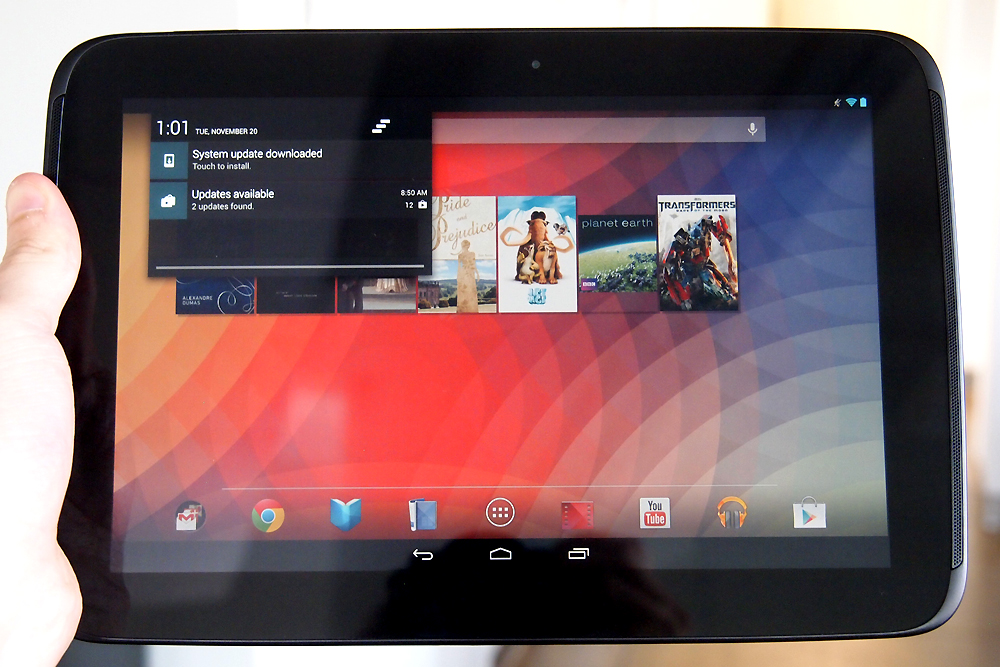
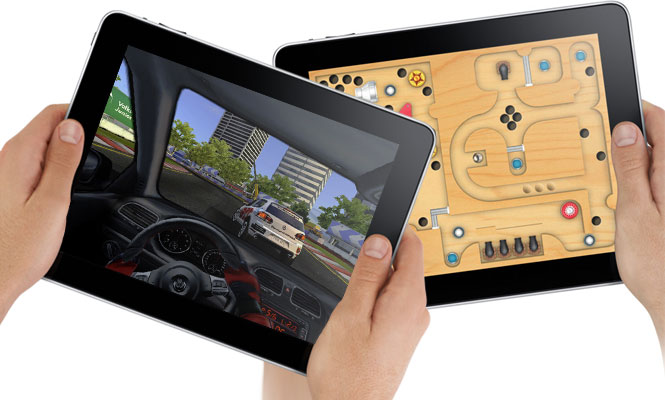
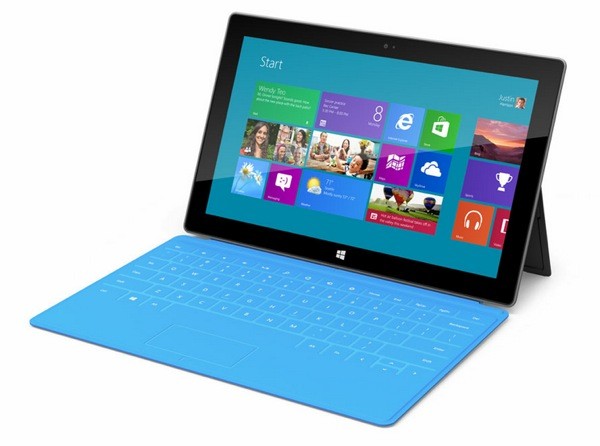
APPLE IPAD vs MICROSOFT SURFACE RT vs GOOGLE NEXUS 10
A lot of people struggle with making the decision on which of these tablets to buy, this comparison by simon hill on Digital Trend should help.
The tablet market has gotten so much more interesting, as of late. The
market-leading iPad finally has some competition that’s worthy of the
name, and both Google and Microsoft have launched large, eye-catching
tablets with their sights set on Apple. If you’re shopping for a tablet
now, the choice is no longer so obvious. Join us as we run through the
highs and lows of the fourth-generation Apple iPad, the Google Nexus 10,
and the Microsoft Surface RT.
Display
Whether you’re reading, watching movies, surfing the web, or gaming, you’ll be staring at that touchscreen for hours. The fourth-generation iPad has a 9.7-inch screen with a 2048 x 1536
pixel resolution, which translates to 264ppi (pixels per inch). It looks
amazing. While Apple’s “Retina Display” used to be streets ahead of its
rivals, that’s no longer the case. The Nexus 10 boasts a 10-inch screen
with a resolution of 2560 x 1600 pixels, which is a whopping 300ppi.
Microsoft obviously missed the memo on better screens because the
Surface lags way behind with a 10.6-inch screen that has a 1366 x 768
pixel resolution, which is a disappointing 148ppi. Still, compare its
screen to anything but an iPad or Nexus 10 and it looks pretty good.
You’ll just notice a few pixels here and there. Both the Nexus 10 and the iPad displays look sharp, colorful, vibrant
and generally awesome. The Surface is clearly the weak link. The Nexus
10 edges the win over the iPad in sheer numbers, but we’re calling it a
draw between Apple and Google in this category.
Design
Surprisingly, the Nexus 10, which is 10.4 x 7 inches, is also a
relatively light and thin tablet. It weighs 1.33 pounds and is only 0.35
inches thick, comparable weight and thickness to any tablet, including
Samsung’s Galaxy devices. The Nexus is plastic and it has the most
rounded curves of the three. It’s probably the most comfortable to hold,
but it’s also the least durable and only comes in black. The
iPad is 9.5 x 7.31 x 0.37 inches and it weighs 1.44 pounds. It has that
solid aluminum unibody and it feels reassuringly expensive. You can get
the iPad in white and silver or black and silver. One of Apple’s
greatest strengths is design and fabrication. The iPad still feels like
the best-built tablet on the market, just not by as big a margin as it
did before. Tall and slim, the Surface measures 10.81 x 6.77 x 0.37 inches and
weighs in at 1.5 pounds, making it the heavyweight of the group. It has
straight edges and a more industrial design. The magnesium chassis and
built-in kickstand give it a different, more precise feel. The covers
slot on easily thanks to the magnetic connector. The Surface only comes
in black, but the covers add a splash of color.
Ecosystem and content
The chances are good that you’re buying a tablet for entertainment
purposes, so you want to know what kind of content you can access and
how easy it is to use. We’ll take a look at the three key areas for
this.
Apps and games
The iPad wins this category not only for sheer variety, but also
because it has more polished games and apps that were specifically
designed for its 9.7-inch screen. Android tablets have access to a lot
of apps, but most of them are only designed for smaller phone
interfaces. Apple was wise to require custom apps for the iPad. If
you’re into gaming, particularly, then the iPad is the way to go. Google’s Nexus 10 can run a huge variety of apps and games accessible
via Google Play. Google’s content offering has improved a great deal in
the last year and you will find more free apps there than in the App
Store. There are some high-quality options too, but as a general rule
the premium apps and games still come to iOS first and get ported to
Android later. Android is still catching up when it comes to tablet
apps. Microsoft has a real challenge on its hands to convince developers to
create apps and games for Windows RT. This version of the OS will only
run apps from the new Windows Store, which only launched in October
2011. Whatever way you slice it there are far, far fewer apps and games
for the Surface.
Movies, TV, and music
Google Play and iTunes offer a good selection of content. There are
more movies and TV shows on Google Play and more music on iTunes, but
most people will look beyond these destinations for their content. You
can get apps for Netflix, HBO Go, Hulu Plus, and Amazon to access more
movies. You can also use services like Pandora and Spotify, or find
music through an app like TuneIn Radio. The Nexus 10 and iPad both offer
a wide variety of popular services for watching TV, movies, and
listening to music. Microsoft lags behind. There are versions of some, but not all, of these apps and services
for Windows RT. The ones that have been ported are not generally as
polished as their iOS or Android counterparts. One advantage that the
Surface could have here is its tie-in with the Xbox 360. If you use your
Xbox as an entertainment hub in the living room, the SmartGlass app
allows you to enjoy a true second-screen experience on your tablet and
remotely control the console. However, you can get the app for Android
and iOS as well.
Books and magazines
There is no shortage of books and magazines on offer for all three
tablets. The iPad has iBooks, but it can also access Google Play Books,
whereas the Nexus 10 can’t access iBooks. You can also get the Kindle or
the Nook app for each one and they are your best bet for choice. Magazines are best on the iPad as the layout tends to be perfect.
Both the iPad and Nexus 10 have good magazine options, but the Surface
lags behind and tends to have more wasted space on screen. Readability
is noticeably better on the sharper Nexus 10 and iPad.
Productivity
If
you intend to use your tablet for work, you’ll find all three are
suitable for checking email, organizing calendars and notes, and editing
documents (with the right apps). But the Surface does gain an edge
here. Even ignoring the keyboard covers, (it’s worth remembering you can
get similar accessories for the iPad or Nexus 10, although they won’t
be as well integrated), the Surface has a few extras up its sleeve. You
can map network drives and access your HomeGroup computers, you can plug
in a second screen, and Remote Desktop comes as standard. All Windows
RT devices also come with a version of Microsoft Office with basics like
Word, Excel, PowerPoint, and One Note. iPad would earn a second place
in this category, but its apps aren’t built in and its keyboard
solutions aren’t as elegant.
Performance
With Nvidia’s 1.3Ghz Tegra 3 quad-core processor and 2GB of RAM, the
Surface is no slouch. The Nexus 10 offers a dual-core, 1.7Ghz Exynos 5
processor also backed by 2GB of RAM. The iPad has Apple’s A6X processor
clocked at 1.4 GHz and just 1GB of RAM. In benchmark tests, the Nexus 10 is the clear winner, although the
iPad is best at processing graphics. The iPad and the Nexus 10 are very
responsive. In hands-on comparisons here at DT though, we’ve found that
the iPad still feels most responsive and works the best for users.
Storage
The Surface comes with either 32GB or 64GB of storage, and it is the
only device to have a microSD card slot so you can boost that by another
64GB. However, it comes with a catch: 13GBof its onboard memory is hogged up by the operating system,
making its claims of 32GB of storage a little disingenuous. The Nexus
10 comes in 16GB or 32GB varieties. The iPad comes in 16GB, 32GB, and
64GB varieties. You also get 7GB of cloud storage for free thanks to Microsoft’s
SkyDrive with the Surface. With the iPad you’ll get 5GB via iCloud.
Google Drive will also give you 5GB for the Nexus 10, but Google Music
also allows you to store up to 40,000 songs, Gmail offers 10GB, and you
can store as many photos as you like in Google+. Interestingly, you can
also get SkyDrive for Android or iOS, and all of Google’s services are
available on iOS or Windows RT. With all that said, no matter which tablet you choose, if you want to
store media or files on your tablet, you’re going to be extremely
limited. We’ve repeatedly ran out of space on our iPads and other
devices when we try to load up content for, say, a long flight. Put a
few Amazon videos on a 16GB tablet or some songs, and space
gets sparse fast.
Cameras
The iPad and the Nexus 10 both have 5-megapixel rear-facing cameras
that can record 1080p video. The Nexus 10 also has a 1.9-megapixel
front-facing camera for video calls while the iPad’s is 1.2-megapixel. The clear loser again is the Surface, which has front and rear
1-megapixel cameras that can record in 720p. However, we must note that
both the front and rear camera are angled – they only point straight
when you have the Surface kickstand out. If you are holding the tablet,
you’ll have to angle it in your hands to get a straight shot. The
Surface camera is obviously only really intended for video calls. It
does feel odd using a tablet to take photos, so this probably won’t be a
big deal for most people.
Connectivity
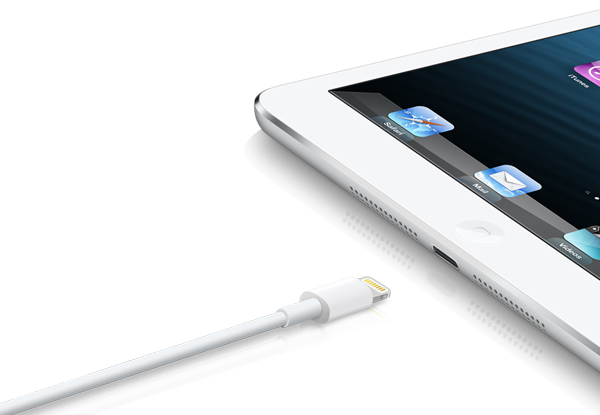
The Lightning connector in the iPad 4 renders old accessories useless
without an expensive adapter. The Nexus 10 is more standard with Micro
USB and Micro HDMI ports. The Surface uses a proprietary AC adapter for
charging and a proprietary HD video out adapter, but it does have a USB
port which can be used to charge mobile devices. All
three have Wi-Fi and Bluetooth. Only the Nexus 10 has NFC. Only the
iPad offers cellular network support for 3G or 4G LTE, but it will cost
you. Overall, when it comes to connectivity, Microsoft’s full-size USB
port takes the cake, and Windows is still better equipped to connect up
to smaller devices like cameras and MP3 players. However, Google’s use
of Micro USB makes it easy to charge the Nexus no matter where you are.
With the iPad, be prepared to pay extra for fancy dongles.
Battery life
There isn’t a huge difference when it comes to battery life. The iPad
wins with 10 hours to the Nexus 10’s 9 hours and the Surface is last
with 8 hours. Actual battery life depends on how you use the device.
Price
The prices get quite complicated when you add in all the various
possible permutations. What we can say is that the Nexus 10 is the
cheapest at $400 for the 16GB, or $500 for the 32GB. The iPad starts at
$500 for the 16GB model and goes up to $830 for the 64GB version with
cellular network support. The Surface RT starts at $500 for the 32GB
model, and you’ll pay $700 for a 64GB version with a Touch Cover. Touch
Covers cost around $100, which is steep. The competition is so fierce that price drops are very likely to be on the horizon. We hope.
Your choice
For a solid tablet at a reasonable price, the Nexus 10 makes the most
sense. If you want the best content, you like to play games, and price
is no object then it has to be the iPad (or check out the iPad Mini).
If you’re looking for a laptop replacement that can go to work with you
and act as a second screen at night then you might consider the
Surface. Still, we’ve found Microsoft’s first tablet entry to have some
growing pains. The hardware is good, but Windows RT is currently limited
and the software selection is similarly stunted. Apple is still king of
the hill. At least, for now. What are your thoughts? Let us know which one you picked up and whether you were pleased with your purchase or not.


 Apple
has finally decided to give iOS a proper redesign. iOS has looked
almost identical update-to-update since the system first arrived back in
2007. That’s when the first iPhone launched – aeons ago in tech terms.
Apple
has finally decided to give iOS a proper redesign. iOS has looked
almost identical update-to-update since the system first arrived back in
2007. That’s when the first iPhone launched – aeons ago in tech terms.
 The
Safari browser of iOS has been given a long-needed overhaul. In common
with the rest of iOS 7, it now tries to keep things simple, with an
interface that hides interface elements until they’re needed.
The
Safari browser of iOS has been given a long-needed overhaul. In common
with the rest of iOS 7, it now tries to keep things simple, with an
interface that hides interface elements until they’re needed.

 For over a year, whispers from

 The biggest feature missing from Hangouts is the ability to send and receive SMS messages to and from friends who don’t have a Hangouts app installed. This means Hangouts isn’t truly universal. Several of its competitors allow it, including Apple’s iMessage and Facebook’s Messenger For Android (but not for iOS).